Sabbatical Log: November 1st
Posted: 2018/11/09 Filed under: code 2 CommentsThis blog series is running about a week behind my actual work, giving me time to clean things up. The date the actual work was done is in the title, horizontal lines indicate when I stopped writing and started coding.
I’m on sabbatical for November, and am taking the time to play around with a kind of coding I’ve never dabbled in: Game Dev. I’ve read a decent amount (mostly Gamasutra and forums), watched a lot of videos (GDC and Handmade Hero), and certainly thought about it – but I haven’t actually done it.
I have no delusions of actually finishing this month, or even making something all that fun. I’m just aiming to Learn Me A Thing™.
The first decisions I’ve made are:
-
- What kind of game?
- A top down action-RPG in the mold of one of my all time favorites

- I’ve also bought Link To The Past a half-dozen times, so I don’t feel scruples about stealing some assets for this little exercise.
- However, I don’t intend to publish the code with assets.
- What language am I working in?
- C#, solely because I like it and know it well. I considered TypeScript and Rust, but while TypeScript is better than JavaScript I still don’t really like working in it and I don’t consider myself proficient in Rust yet.
- What, if any, framework am I using?
- I’m going to use MonoGame.
- I only want something to handle the blitting of pixels into the screen for me, I intend to implement all other systems myself, and MonoGame looks like it fits the bill.
- What kind of game?
I guess it’s, time to get to work.

My first focus was on some infrastructure, namely a barebones Entity-Component-System.
I’ve decided that there are basically two “types” of Components (binary/flags and stateful ones), Entities are just id numbers, and Systems work over enumerations of entities having some component. All of entity management bits are wrapped up in an EntityManager class like so

Specifically, the EntityManager class handles:
-
-
- Creating entities
- Release entities
- Attaching and removing flag components to entities
- Attaching and removing stateful components to entities
- Enumerating entities with specific flag or stateful components
- Fetching flag or stateful components for specific entities
-
Since I expect garbage collection to be something of an enemy in this project, I’m keeping allocations to a minimum. For the EntityManager class that means I only allow a fixed number of entities, and a fixed number of stateful components per entity – the required space for tracking both sets is allocated up front, in the constructor. I’m also avoiding all LINQ-to-Objects, and using C#’s duck typing of foreach to avoid allocations during miscellaneous logic.
I’ve also written test cases for this class, and it is my intent to continue to do so for all future code. I’ve read it can be pretty hard to actually test games, so we’ll see how well I can keep to that.
I’ve now implemented enough systems and components to get a box moving on the screen; and it only took ~5 hours of work.
My solution now looks like so
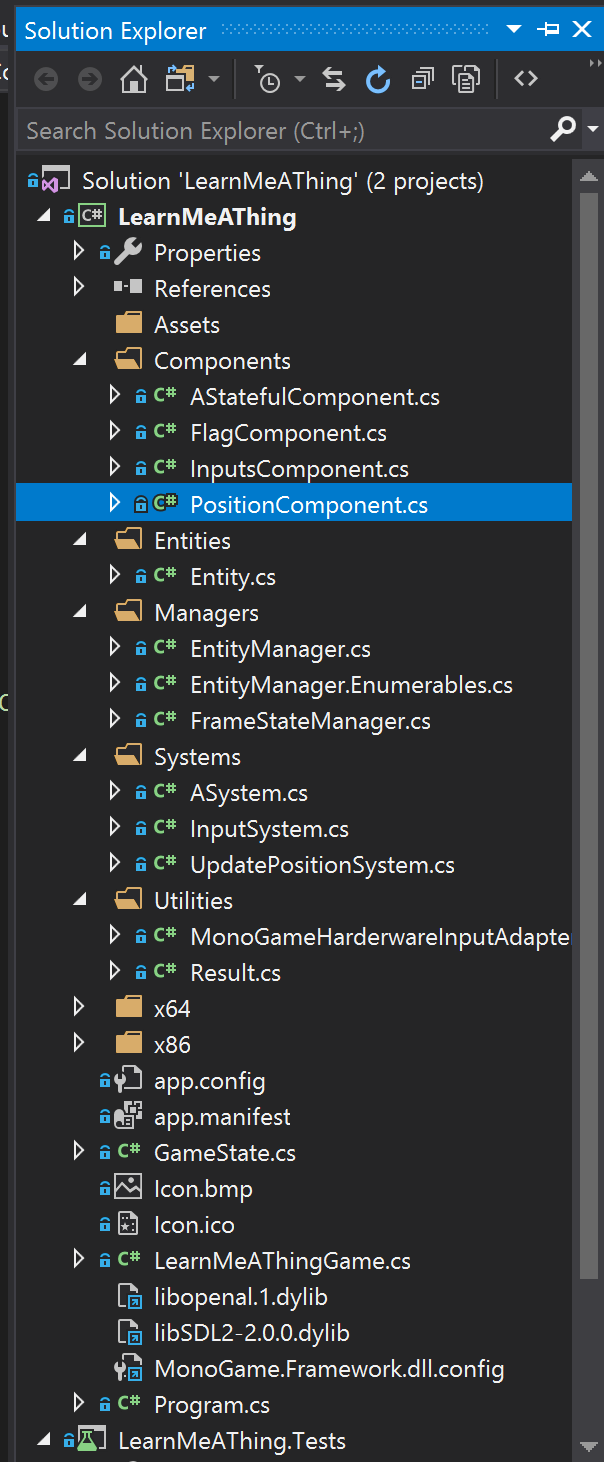
I’ve got some components:
-
-
- InputComponent receives “input” from a player
- Although I don’t intend for their to be multiple players, this abstraction is nice because it lets me mock input handling more easily
- PositionComponent holds an X & Y for an entity
- I’m using subpixels, so this entity also does the conversion (only the subpixels are writable)
- I also added FlagComponent.Player (my first “boolean” component) to mark the player entity
- Although I’m also assuring that Id=1 is always the player elsewhere, it feels cleaner to have an explicit marker for the player
- InputComponent receives “input” from a player
-
My first two systems are:
-
-
- InputSystem, which takes input from MonoGame and updates InputComponent baring entities
- This actually works off an interface, so it can be mocked. MonoGameHardwareInputAdapter does the actual mapping of GamePadState and KeyboardState to “PressedKeys”.
- Testing so far is minimal, but still seems workable. For example:
- UpdatePositionSystem is a temporary system that updates player entities’ PositionComponent based on their InputComponent.
- All the logic it really does is keeping the player entity inbounds with some hardcoded sizes
- I consider this temporary because I think it’d be more sensible to model velocity and have player movement handled by the same “physics” that moves everything else
- InputSystem, which takes input from MonoGame and updates InputComponent baring entities
-

And I’ve introduce a GameState class that wraps around the EntityManager and has an Update(TimeSpan) method which triggers the various systems in the appropriate order. Not putting any of the logic in the Game-derived class makes it easier to test – in fact you can see the creation and use of a GameState in the above test.
All of the above gets us to logically moving the player, but there’s no code for actually drawing it. To solve that, I introduce a FrameStateManager that is used to construct a FrameState which is used is then translated into Draw calls. While I could directly translate GameState into Draw calls, I like introducing an intermediary representation for a few reasons:
-
- Once the FrameState is constructed, it’s safe to modify GameState again; so in theory I could get a leg up on the next frame while still rendering the previous one. I doubt that will be necessary, but it’s conceptually nice.
- Going the other way, constructing a separate FrameState makes it much less likely I’ll accidentally modify GameState as part of rendering.
- A separate FrameState makes it possible to “record” a play session into a parseable representation, which will hopefully make testing easier.
- In the age of Twitch, YouTube, and speed running – recording gaming sessions is commonplace. Being able to “record” into something that can then be properly rendered later just strikes me as neat.
LinqAF: Release 3.0.0
Posted: 2018/06/10 Filed under: code Comments Off on LinqAF: Release 3.0.0A new release (3.0.0) of LinqAF is now available on NuGet, and it’s got a decent amount of new stuff.
New Operators
LinqAF 3.0.0 introduces the following operators:
- Append (added in .NET Framework 4.7.1)
- Prepend (likewise)
- SkipLast (added in .NET Core 2.0)
- TakeLast (likewise)
- ToHashSet (adding in .Net Framework 4.7.2)
In particular I found myself really wanting ToHashSet() when I was playing around with converting existing projects to LinqAF, practically every project seems to have a homegrown version.
Convenience Methods
IEnumerable<T> is used all over the place in .NET, and in prior versions of LinqAF you’d need to add an AsEnumerable call to call them. Even worse, some methods (like those on String) take either IEnumerable<T> or object so porting to LinqAF could introduce bugs.
Now LinqAF provides implementations, as extension methods, of the following methods that take all of LinqAF’s enumerables:

Choosing relevant images is hard.
- HashSet<T>, ISet<T>, and SortedSet<T>’s
- ExceptWith
- IntersectWith
- IsProperSubset
- IsProperSuperset
- IsSubsetOf
- IsSupersetOf
- Overlaps
- SetEquals
- SymmetricExceptWith
- UnionWith
- List<T>
- AddRange
- InsertRange
New classes have been added that provide implementations of commonly used static methods, as well as pass-throughs to the normal classes:
- LinqAFString as an alternative to System.String, providing LinqAF friendly versions of
- Concat
- Join
- LinqAFTask as an alternative to System.Threading.Task, with friendly versions of
- WaitAll
- WaitAny
- WhenAll
- WhenAny
Additionally, a helper class for calling the constructors of built-in collections has been added, LinqAFNew, which provides methods equivalent to the enumerable consuming constructors of:
- HashSet<T>
- LinkedList<T>
- List<T>
- Queue<T>
- SortedSet<T>
- Stack<T>
Performance Improvements
The biggest change is that RangeEnumerable and ReverseRangeEnumerable are no longer generic, making the performance of anything involving Enumerable.Range() considerably faster as there’s no reflection going on.
The Future
At this point LinqAF is pretty close to feature complete, I don’t think I’ll be adding many more operations. I am quite interested in increasing the performance of the current operators, while LinqAF is always lower in allocations it remains slower than LINQ-to-Objects for many cases.
Checkout LinqAF on NuGet or GitHub
LinqAF: The (possible) future
Posted: 2018/01/26 Filed under: code Comments Off on LinqAF: The (possible) futureThis is part of a series on LinqAF, you should start with the first post.
What’s missing from LinqAF?
The number one missing thing is performance. LinqAF isn’t terribly slow, but it’s not consistently faster than LINQ-to-Objects and there’s no real reason it couldn’t be. This would take the form of much more extensive profiling, and a likely a decent chunk of unsafe code.
There are also lots of additional operators that could be added. Operators new to 4.7.1 like Append, Prepend, SkipLast, TakeLast, and ToHashSet or the extensive operators available in packages like MoreLINQ. While the nature of LinqAF means each additional operator adds significantly to the generated code size, the code generation infrastructure makes it entirely feasible.
There are built-in enumerables that aren’t optimized for, like the Dictionary<TKey, TValue> and SortedDictionary<TKey, TValue> types, because they require more effort as a consequence of having two generic parameters. It’d be neat to include the immutable collections introduced in .NET 4.5 as well.
What’s missing from C#?

Missing from this blog? On topic images.
A few changes to C# would make it possible to meaningfully improve LinqAF – ref extension methods, and improvements to generic type inferencing.
In the places where LinqAF does use extension methods (mostly in the numerical operators like Max, Average, and Sum), it’s forced to pass the source enumerable by value. This entails making a copy of a (potentially quite large) struct, which has a deleterious impact on performance. It is because of this copying cost that internally LinqAF passes all enumerables by reference. Ref extension methods, allowing something like static MyEnumerable<TSource> MyOperator<TSource>(this ref TSource source), would prevent this copying. This feature may make it into a future version of C#, and is presently championed by Mads Torgersen.
The reason LinqAF doesn’t use extension methods more extensively is because of weaknesses in C#’s generic type inferencing. In a nutshell,
// in some static class
public static WhereEnumerable<TItem, TInnerEnumerable, TInnerEnumerator>
  Where<TItem, TInnerEnumerable, TInnerEnumerator>(
    this TInnerEnumerable source,
    Func<TItem, bool> predicate
  )
  where TInnerEnumerable: struct, IStructEnumerable<TItem, TInnerEnumerator>
  where TInnerEnumerator: struct, IStructEnumerator<TItem>
{ /* ... */ }
will not successfully be invoked by code like
var e = /* some struct implementing IStructEnumerable<...>
e.Where(i => true);
instead it fails with a CS0411 error (type arguments for the method cannot be inferred). If this weren’t the case everything except the overrides in LinqAF could be implemented as extension methods, which would drastically reduce the size of the codebase and the final DLL. The one attempt in this direction that I’m aware of came to nothing due to problems with backwards compatibility. With compatibility concerns, the increase in complexity, and presumably compile times – I’d be a little surprised if it were done in a future C# version. That said, LinqAF would benefit from it if it were.
What could be improved?
As mentioned in an earlier post, I’m very interested in alternatives to BoxedEnumerable<T>. I spent a decent amount of time playing around with a tagged union approach, but could never come up with anything workable.
The RangeEnumerable<T> type being generic over T instead of being bound to int is a blemish. Fixing this would let me remove the MiscUtil dependency, and would improve the performance of the Range operator. The major stumbling block is that the LinqAF.Generator project assumes all enumerables are generic over T, and Range being an exception would require significant amounts of work.
And that’s it!
This is the end of my series on LinqAF. Once again, the code is on Github and a Nuget package is available. Below is a table of contents for easy reference.
Thanks for reading!
Table of contents
- A series of questionable ideas
- Replacing LINQ and not allocating
- Generating way too much code
- All the operations
- Allocating
- SelectMany and boxing
- Testing
- Benchmarks
- The (possible) future
LinqAF: Benchmarks
Posted: 2018/01/25 Filed under: code Comments Off on LinqAF: BenchmarksThis is part of a series on LinqAF, you should start with the first post.
How is LinqAF benchmarked?
I make use of the excellent BenchmarkDotNet library which makes it easy to profile different configurations, and calculate meaningful statistics. Concretely, I profile both the legacy x86 JIT and the x64 RyuJit configurations with the concurrent server garbage collector.
I created separate benchmarks for:
- Each LINQ operator, including different overrides
- Nullable and non-nullable versions for Average, Max, Min, and Sum
- Both typed and untyped underlying enumerables for Cast
- Sized and unsized underlying enumerables for Reverse, ToArray, ToDictionary, and ToList
- Three actual LINQ uses from the Stack Overflow, Jil, and Roslyn codebases
- One giant synthetic case that uses very nearly every operator at once
I ran all benchmarks on a machine with the following specs (as output by BenchmarkDotNet):
BenchmarkDotNet=v0.10.9, OS=Windows 10 Redstone 1 (10.0.14393)
Processor=Intel Core i7-6900K CPU 3.20GHz (Skylake), ProcessorCount=16

Cats reacting to poor performance.
My goal with LinqAF was to produce a (very nearly) allocation free implementation of LINQ-to-Objects, and so that is what I focused on when benchmarking – either zero allocations when possible, or fewer allocations than the equivalent LINQ-to-Objects operator. Ultimately, I did achieve my goal with LinqAF – however, since I didn’t focus on performance, there are plenty of cases where LINQ-to-Objects is faster than LinqAF.
In particular, the following operators are slower in LinqAF than in LINQ-to-Objects:
- Any (without predicate)
- Average
- Cast (if the underlying type is actually an IEnumerable<T>)
- Concat
- DefaultIfEmpty (with a parameter)
- Distinct
- Except
- GroupBy
- GroupJoin
- Intersect
- Join
- Max (for nullable types)
- Min (for nullable types)
- OrderBy & OrderByDescending
- Range
- Select
- SelectMany
- SequenceEqual
- Skip & SkipWhile
- Sum (for nullable types)
- Take & TakeWhile
- ThenBy & ThenByDescending
- ToArray (if the underlying type isn’t an IList<T>)
- ToDictionary
- ToList
- ToLookup
- Union
- Where
- Zip
Most of these operations are only a little slower, but Cast is actually quite a bit slower (taking more than twice as much time). This is because an optimization that is available to LINQ-to-Objects is made impossible by LinqAF’s “everything is a struct”-design.
You can run all the benchmarks on your own by executing the LinqAF.Benchmark project – be sure to build in Release mode, or you’ll get inaccurate results. A full log of the run I did for this post can be found here – at the end of the file you’ll find all the slower benchmarks, and how much slower they were exactly.
Benchmarking is always fraught with issues – if you have any interesting cases where LinqAF allocates more than LINQ-to-Objects or is incredibly slower I’d be interested in hearing about it.
What’s next?
In the last post in this series, I’ll go over what’s missing for LinqAF as well as what direction future work could take.
LinqAF: Testing
Posted: 2018/01/24 Filed under: code Comments Off on LinqAF: TestingThis is part of a series on LinqAF, you should start with the first post.
How is LinqAF tested?

Cats testing claws.
In comparison to LINQ-to-Objects, LinqAF has a much larger surface to test – every enumerable implementation (of which there is at least one, and often more than one, per LINQ operation) exposes more than 3,000 methods.
Every operation has its own test class (using Microsoft’s UnitTestFramework), and includes at least the following tests:
- Universal – which tests that every enumerable exposes the expected methods for the operation. I.E. AnyTests.Universal confirms all enumerables have Any() and Any(Func<T, bool>) methods.
- Malformed – which tests that every operation properly fails if called on a malformed (typically obtained via default(T)) enumerable.
- Chaining – which tests that every operation performs as expected when called on each enumerable.
Most operation’s test class also has an Errors test, which assures that every enumerable properly handles the error cases (like null arguments) in a consistent and correct manner.
Each operation also has additional tests that cover simple invocations (typically on a single enumerable), for easy of debugging.
Finally, I pulled in the entire Edulinq test suite. This covers all the little edge cases of a proper LINQ implementations, kudos to Jon Skeet yet again.
What’s the LinqAF.TestRunner project for?
Visual Studio’s test runner process falls over if you attempt to run the entire LinqAF test suite – a number of the tests create lots and lots of types, which eventually results in an OutOfMemoryException in the 32-bit process.
TestRunner runs every test in a separate process, in addition to gathering coverage statistics using OpenCover. I use Visual Studio while bug fixing, and the TestRunner project when confirm that a build is ready for release. I don’t use TestRunner during normal development because it takes between several hours and a day or so to run (depending on the machine I’m using).
What’s next?
In the next post, I’ll cover how I’ve benchmarked LinqAF as well the results of said benchmarking.
LinqAF: SelectMany and boxing
Posted: 2018/01/23 Filed under: code Comments Off on LinqAF: SelectMany and boxingThis is part of a series on LinqAF, you should start with the first post.
What’s weird about SelectMany?

Selecting many cats.
Unlike most other LINQ operators, SelectMany is used with a delegate that returns another enumerable. Because a delegate is involved arbitrary logic may be invoked, which means that the “type” of enumerable returned may not be constant.
For example, the following code is perfectly legal:
new [] { 0, 1 }.SelectMany(
  i => i % 2 == 0 ?
    new [] { "foo" } :
    System.Linq.Enumerable.Empty<string>()
)
This presents no problem for LINQ-to-Objects since both enumerables implement IEnumerable<T> and there’s a free (in that it doesn’t allocate) upcast, but for LinqAF no such thing exists.
There’s no allocation-free way to handle this case, we must “box” the enumerable returned in either path. For this purpose I introduced a BoxedEnumerable<T> which every enumerable can be converted to with a Box() call (an explicit cast also exists for all LinqAF’s enumerables). This does result in an allocation (the boxed enumerable must be placed on the heap).
This does require changing the above example to:
new [] { 0, 1 }.SelectMany(
  i => i % 2 == 0 ?
    new [] { "foo" }.Box() :
    LinqAF.Enumerable.Empty<string>().Box()
)
This represents the only intentional non-“type inference compatible” deviation from LINQ-to-Objects. While SelectMany is the operator this deviation is most likely to occur with, any case where different operators are coalesced into a single expression can trigger it.
I consider the BoxedEnumerable<T> type a blemish on LinqAF but I was unable to come up with a workable alternative, so if you come up with one I’d be interested in hearing about it.
What’s next?
I’ll be going over how LinqAF is tested.
LinqAF: Allocating
Posted: 2018/01/22 Filed under: code Comments Off on LinqAF: AllocatingThis is part of a series on LinqAF, you should start with the first post.
When does LinqAF allocate?
The whole point of LinqAF is to be a low-allocation re-implementation of LINQ-to-Objects, so why does it allocate at all?
The answer is that there are a few operations that, logically, must allocate:
- Distinct
- Needs to track what has already been yielded
- Except
- Needs to track what cannot be yielded
- GroupJoin
- Needs to keep track of groups as it iterates over a sequence
- Intersect
- Needs to track what can be yielded
- Join
- Needs to keep track of items in the first sequence to join against the second
- OrderBy(Descending) & ThenBy(Descending)
- Needs to enumerate the whole sequence before it can begin sorting
- Reverse
- Needs to enumerate the whole sequence to find the last item before yielding
- ToArray
- Has to allocate the returned array
- ToList
- Has to allocate the returned list
- ToLookup
- Needs to build an internal dictionary to lookup groups by
- ToDictionary
- Has to allocate the returned dictionary
- Union
- Needs to track what has already been yielded
There are many cases (like passing known Empty enumerables) that can be optimized to not allocate, but in general these are unavoidable.
LinqAF allows for some application-specific optimizations by letting consumers register an alternative IAllocator which handles actual allocations. For example, you could exploit the knowledge that no enumerables in a web app survive past a request and re-use allocated List<T>s.
IAllocator exposes the following methods:
- GetArray<T>(int)
- ResizeArray<T>(ref T[], int)
- GetEmptyList<T>(int?)
- GetPopulatedList<T>(IEnumerable<T>)
- GetEmptyDictionary<TKey, TValue>(int?, IEqualityComparer<TKey>)
- EnumerableBoxed<T>()
- This is called for profiling purposes only
How does LinqAF minimize the size of necessary allocations?

It’s possible to safely reduce the number of cats pictured.
In cases where allocations must be made LinqAF can still minimize allocations by using specialized types rather than the generic ones in the BCL.
CompactSet<T> is used by Intersect, Except, Union, and Distinct in place of HashSet<T>. It stores all elements in a single array (which can be shared in some cases, reducing duplication) and optimizes the common case where a “bucket” has a single value to avoid allocating an array. CompactSet<T> only supports adding elements, as that is the only method needed for LINQ operators.
LookupHashtable<TKey, TElement> is used by ToLookup (which itself backs Join, GroupBy, and GroupJoin) in place of Dictionary<TKey, TElement>. It also stores all elements in a single array, and optimizes the common case where a “bucket” has a single value. Unlike CompactSet<T>, LookupHashtable<TKey, TElement> can be enumerated in a stable order.
OrderBy(Descending) uses a StructStack<T> in place of a Stack<T> internally to keep track of subsets needing sorting. StructStack<T> only supports Push(T) and Pop(), as that’s all that is needed for OrderBy(Descending).
LinqAF also reduces allocation sizes by shrinking structs by omitting as many fields as possible, and by liberally applying [StructLayout(LayoutKind.Auto)] to allow the runtime to reorder fields for packing efficiency.
When does LINQ inherently allocate?
There are cases where the LINQ expression-to-method-calls transformation introduces some inherent allocations. For example, repeat chains of from expressions like
int[] xs, ys, zs =/* initialization code */

var e =
  from x in xs
  from y in ys
  from z in zs
  select x + y + z;
introduces an anonymous object to hold x, y, and z. The compiler produces code equivalent to
int[] xs, ys, zs =/* initialization code */

var e =
  xs.SelectMany(_ => ys, (x, y) => new { x, y })
    .SelectMany(_ => zs, (xy, z) => xy.x + xy.y + z);
which has an allocates four delegates, one of which itself allocates an anonymous object per invocation.
I personally always use explicit method calls rather than the expression-style of LINQ which makes any “inherent” allocations an explicit and visible part of my code. If you prefer the expression-style, then you should be aware that there are cases where the compiler will insert allocations outside of LinqAF’s code.
What’s next?
I’ll cover the peculiar case of SelectMany and why LinqAF must have a notion of “boxing”.
LinqAF: All the operations
Posted: 2018/01/19 Filed under: code Comments Off on LinqAF: All the operationsThis is part of a series on LinqAF, you should start with the first post.
What operations does LinqAF support?

So many operations. And cats.
All the ones the LINQ does, and LinqAF sports numerous optimizations that additional type information makes possible.
Concretely:
- Aggregate
- AsEnumerable
- Average
- Cast
- Concat
- Optimizes concatenating to a known empty enumerable
- Count
- DefaultIfEmpty
- Optimizes the case where a value is not provided
- Optimizes Any() to always return true
- Optimizes DefaultIfEmpty() to always return itself
- Distinct
- Optimizes multiple calls to Distinct() without providing a comparer
- ElementAt(OrDefault)
- Except
- First(OrDefault)
- GroupBy
- GroupJoin
- Intersect
- Join
- Optimizes joining to a known empty enumerable
- Last(OrDefault)
- LongCount
- Max
- Min
- OfType
- OrderBy
- OrderByDescending
- Reverse
- Optimizes repeatedly calling Reverse()
- Select
- Optimizes repeatedly calling Select()
- Optimizes calling Where() after Select()
- SelectMany
- Optimizes projecting to a known empty enumerable
- SequenceEqual
- Single(OrDefault)
- Skip
- Optimizes repeated calls to Skip()
- SkipWhile
- Sum
- Take
- Optimizes repeated calls to Take()
- Presizes collections returned by ToList(), ToArray(), and ToDictionary()
- TakeWhile
- ThenBy
- ThenByDescending
- ToArray
- ToDictionary
- ToList
- ToLookup
- Union
- Where
- Optimizes repeated calls to Where()
- Optimizes calling Select() after Where()
- Zip
There are also three static methods on Enumerable that expose special enumerables which sport many optimizations. They are:
- Empty
- Aggregate() with no seed always throws
- Aggregate() always returns seed, or seed passed to resultSelector, depending on overload
- Any() is always false
- AsEnumerable() always results in an empty IEnumerable
- Average() over non-nullable types always throws an exception
- Average() overnullable types always returns null
- DefaultIfEmpty() can be optimized into a “OneItem” enumerable
- Cast() always results in an empty enumerable of the destination type
- Concat() calls return the non-empty parameter
- Contains() always returns false
- Count() is always 0
- Distinct() always returns an empty enumerable
- ElementAt() always throws an exception
- ElementAtOrDefault() always returns default
- First() always throws an exception
- FirstOrDefault() always returns default
- GroupJoin() results in an empty enumerable
- Join() results in an empty enumerable
- Last() always throws an exception
- LastOrDefault() always returns default
- LongCount() is always 0
- Min() and Max() over non-nullable types always throw exceptions
- Min() and Max() over nullable types always return null
- OfType() always results in an empty enumerable of the destination type
- OrderBy() and OrderByDescending() result in a special EmptyOrdered enumerable
- Reverse() results in an empty enumerable
- Select() results in an empty enumerable
- SelectMany() results in an empty enumerable
- SequenceEqual() always has the same result for many types (DefaultIfEmpty => false, another Empty => true)
- SequenceEqual() devolves to a Count or Length check on things like List<T> or Dictionary<T,V>
- Single() always throws an exception
- SingleOrDefault() always returns default
- Skip() and SkipWhile() result in an empty enumerable
- Sum() is always 0
- Take() and TakeWhile() result in an empty enumerable
- ToArray(), ToList(), and ToDictionary() results can all be pre-sized to 0
- ToLookup() can return a global, known empty, Lookup
- Where() results in an empty enumerable
- Zip() results in an empty enumerable
- Range
- Any() without a predicate just check the inner count
- Count() and LongCount() just return the inner count
- Distinct() with no comparer returns itself
- ElementAt() and ElementAtOrDefault() are simple math ops
- Contains() is a range check
- First() and FirstOrDefault() return the starting element, if count > 0
- Last() and LastOrDefault() are simple math ops
- Max() is equivalent to Last()
- Min() is equivalent to First()
- Reverse() can return be optimized into a “ReverseRange” enumerable
- SequenceEqual() against another range enumerable can just compare start and count
- SequenceEqual() against a repeat enumerable is only true if count is 0 or 1
- Single() and SingleOrDefault() just check against count and return start
- Skip() advances start and reduces count
- Take() reduces count
- ToArray(), ToDictionary(), and ToList() can be pre-sized appropriately
- Repeat
- Any() without a predicate just check the inner count
- Contains() just check against the inner object
- Count() and LongCount() just return the inner count
- Distinct() without a comparer returns a repeat enumerable with 0 or 1 items as appropriate
- ElementAt() and ElementAtOrDefault() return the inner item
- First() and FirstOrDefault() return the inner item
- Last() and LastOrDefault() return the inner item
- Max() and Min() return the inner item
- SequenceEqual() against an empty enumerable is just a check against the inner count
- SequenceEqual() against a range enumerable is only true if count is 0 or 1
- SequenceEqual() against another repeat enumerable just checks for equality between the inner item and the inner count
- Single() and SingleOrDefault() just check the inner count and return the inner item
- Skip() is equivalent to reducing the inner count
- Take() is equivalent to replacing the inner count
- ToList() and ToArray() can be pre-sized appropriately
As mentioned in the above lists, LinqAF introduces a few new “kinds” of enumerables as optimizations. Some of these actually exist behind the scenes in LINQ-to-Objects, but the IEnumerable<T> interface conceals that. These new enumerables are:
- EmptyOrdered
- Representing an empty sequence that has been ordered
- All the optimizations on Empty apply, except that Concat() calls with EmptyOrdered as a parameter cannot return EmptyOrdered – they return Empty if they would otherwise return EmptyOrdered
- OneItemDefault
- Represents a sequence that is known to only yield one value, and that value is default(T)
- All() only checks against the single item
- Any() without a predicate is always true
- Contains() checks against the single item
- Count() and LongCount() are always 1
- Count() and LongCount() with predicates are 0 or 1, depending on the single item
- DefaultIfEmpty() returns itself
- ElementAt() throws if index is not 0, and always returns default(T) if it is
- ElementAtOrDefault() always returns default(T)
- First(), FirstOrDefault(), Last(), LastOrDefault(), Single(), and SingleOrDefault() all return default(T)
- Reverse() returns itself
- ToArray(), ToList(), and ToDictionary() can a be pre-sized to 1 item
- OrderBy() and OrderByDescending() result in a special OneItemDefaultOrdered enumerable
- OneItemSpecific
- Represents a sequence that is known to only yield one value, but that value is determined at runtime
- Has all the same optimizations as OneItemDefault, except the specified value is returned where appropriate and OrderBy() and OrderByDescending() result in a special OneItemSpecificOrdered enumerable
- OneItem(Default|Specific)Ordered
- Represents one of the OneItem enumerables that have been ordered
- All the optimization on their paired OneItem enumerable apply, except that Concat() calls cannot return a OneItem(Default|Specific)Ordered – they return the paired unordered enumerable if they otherwise would
- ReverseRange
- Represents a Range that has been reversed – that is, it counts down from a value
- All the optimizations on Range apply, except that calling Reverse() on a ReverseRange results in a Range
- SelectSelect
- Represents repeated calls to Select() – this allows a single enumerator to handle the entire chain of calls
- Select() results in yet another SelectSelect
- Where() results in a SelectWhere
- SelectWhere
- Represents any number of Select() calls followed by any number of Where() calls – this allows a single enumerator to handle the entire chain of calls
- Where() results in a SelectWhere
- WhereSelect
- Represents any number of Where() calls followed by any number of Select() calls – this allows a single enumerator to handle the entire chain of calls
- Select() results in a WhereSelect
- WhereWhere
- Represents repeated calls to Where() – this allows a single enumerator to handle the entire chain of calls
- Select() results in a WhereSelect
- Where() results in a WhereWhere
These gigantic lists are a pretty good demonstration of how many cases additional compile time typing lets us optimizes.
What’s next?
LinqAF: Generating way too much code
Posted: 2018/01/18 Filed under: code Comments Off on LinqAF: Generating way too much codeThis is part of a series on LinqAF, you should start with the first post.
Why use codegen for LinqAF?
As mentioned in the previous article, LinqAF defines a type per operator and has to define many instance methods on each type. When you add it all up, replacing LINQ-to-Objects requires ~50 enumerable structs each of which exposes ~1,300 methods.
So yeah, I didn’t do it by hand.
The C# compiler has been re-implemented and open-sourced, resulting in the Roslyn project. This makes it really easy to manipulate and reason about C# code, which I used to fashion a templating system to generate LinqAF. Specifically, I was able to keep the templates mostly “correct” C# that benefited from type checking and Visual Studios navigation faculties.
Concretely:
- Every LINQ operator has an interface defined (IConcat, IMin, ISelectMany, etc.)
- Each logically distinct method gets a CommonImplementation… implementation (So Concat gets a few methods, Min gets a lot, SelectMany gets several)
- A template is defined that implements the interfaces and calls the appropriate CommonImplementation methods.
- Here
dynamiccomes into play, as many templates elide generic parameters (these parameters are filled in later)
- Here
- Similarly templates are defined for various extension methods
- Inter-operating with IEnumerable<T> and other collections defined in the BCL
- Average
- Concat for enumerables with two generic parameters
- Except for enumerables with two generic parameters
- Intersect for enumerables with two generic parameters
- Max
- Min
- SequenceEqual for enumerables with two generic parameters
- Sum
- Union for enumerables with two generic parameters
- Overrides that replace particular generated methods with other, static, C# code
- This allows LinqAF to leverage static type information to avoid doing pointless work
- For example, almost all operators on the EmptyEnumerable are replaced with implementations that elide most work
- A separate project, LinqAF.Generator, processes all these templates to generate the final code
- There are 70 different steps, most corresponding to a particular operator
- Roslyn is also used to remove unused using statements and nicely format the final code
This code generation approach let me keep the “actual” implementation of LinqAF under 20,000 lines of code.
What are the downsides to code generation?

Code generation is typically a worse idea than a cat
The biggest one is that iteration time is much worse, and it got worse as more operators were implemented. This is mitigated somewhat by sharing common implementations in (…) CommonImplementation, allowing bug fixes to be copy/pasted for quick testing; bugs in the code generation parts are still slow to fix.
While limited in scope, the reliance on dynamic in certain places also means that the LinqAF project can compile even if there are actually type errors. This was most common when adding new operators, and commenting out the other operators let me decrease the iteration time considerably.
Code generation is also harder to understand and setup as this post’s existence demonstrates. Thankfully the Roslyn project, and it’s availability on Nuget, makes code generation considerably less difficult – using something like T4 or outright concatenation would have been even worse.
What’s next?
In what will probably be the longest post in the series, I cover most of the operators and the various optimizations that LinqAF has for them.
LinqAF: Replacing LINQ and not allocating
Posted: 2018/01/17 Filed under: code Comments Off on LinqAF: Replacing LINQ and not allocatingThis is part of a series on LinqAF, you should start with the first post.
How is LINQ-to-Objects replaceable?
The C# language has a number of keywords that are used with any LINQ provider. Fortunately for me, these keywords are equivalent to methods calls. In other words: from myItem in myList where myPredicate(myItem) is equivalent to myList.Where(myItem => myPredicate(myItem)). These method calls are unqualified and untyped, so all that matters is that some code somewhere provides a definition for Where, System.Linq isn’t privileged nor is IEnumerable<T>.
Similarly, C#’s foreach statement makes untyped and unprivileged calls to GetEnumerator(). The BCL uses this trick extensively to reduce allocations when enumerating over collections in System.Collections.Generic (for example see how List<T> has a GetEnumerator() method that returns a struct).
How does LinqAF avoid allocating?

Allocations frighten kitty
The biggest trick is that all operations in LinqAF are represented as structs, whereas LINQ-to-Objects always returns an IEnumerable<T> or IOrderedEnumerable<T>. This means that LinqAF is going to perform 0 allocations for most LINQ operations (the exceptions are covered in a later post) versus LINQ-to-Objects minimum of 1 allocation.
LinqAF also implements custom struct enumerators for each enumerable which can result in fewer allocations. The savings are less for these enumerators because LINQ-to-Objects uses some tricks (like this internal Iterator<T> class) to avoid allocating enumerators in common cases.
Technically LinqAF could achieve these optimizations just by duck typing, but for ease of development and some type checking peace of mind I have all enumerables implement the IStructEnumerable interface and all enumerators implement IStructEnumerator.
There are lots of consequences (and some additional advantages) to having all these different structs flying around. The first big consequence is that LinqAF cannot implement most operations as extension methods, instead I had to use instance methods. This is because generic parameter inferencing ignores type constraints, and I have lots of : struct and : SomeInterface constraints to ensure the correct guarantees are upheld.
Another consequence is that I could not have parameters of a single enumerable type, I had to provide overloads for each of the concrete operator types to avoid boxing. This meant that rather than each enumerable struct having a single Concat method they had sixty-nine(!), with similar increases in method counts for other operators. All told LinqAF ended up being 2,500+ files and 100,000+ methods, which is much much larger than the official LINQ-to-Objects implementation. Naturally creating all of those files and methods by hand would have been masochistic, I cover exactly how I generated them in the next post.
Using structs also introduces a new kind of “uninitialized” error. In C# you cannot hide a struct’s parameterless constructor (technically you cannot implement a structs default constructor either, but that matters less), which means that it’s possible to create a non-null but also not valid enumerable to use with LinqAF. Since LINQ’s semantics require failing-fast on invalid arguments, I add an IsDefaultValue method to all enumerables to detect this scenario.
There are advantages to having all these different types – I can avoid dynamic dispatch (all calls on structs are non-virtual calls), and allow more optimization opportunities. LINQ-to-Objects has some optimizations for when the actual type of an IEnumerable<T> is a List, array, WhereEnumerableIterator, and so on – but relies on runtime type checking. LinqAF can perform many of these same optimizations, but statically – for example WhereEnumerable’s Select method returns a WhereSelectEnumerable and it’s Where method builds up a chain of predicates (both optimizations avoid creating pointless additional enumerables and enumerators).
What’s next?
I cover how LinqAF is structured and how the final (massive) code is produced.

 Kevin Montrose